

The Strategic IT Plan Roadmap


A Practical Guide for Growing Businesses
For small to mid-sized businesses, technology isn't just a support function—it's a strategic differentiator. The right IT infrastructure can enable rapid scaling, while poor technology choices create bottlenecks that stifle growth.
This guide walks through the complete lifecycle of IT maturity: selecting the right Managed Services Provider, building an actionable technology roadmap, stabilizing budgets through modern procurement strategies, and making informed infrastructure decisions that balance cost, security, and performance.
Key Takeaways
This article provides a framework for strategic IT planning. You'll learn how to evaluate Managed Services Providers beyond their marketing claims, focusing on contract terms, security practices, and operational depth. We'll show you how to build a 12-36 month technology roadmap that aligns IT spending with business objectives, and how to leverage standardization and Hardware as a Service to eliminate budget surprises. Finally, we'll compare infrastructure options—on-premises, public cloud, and private cloud—to help you choose the right environment for your specific needs.
Part 1: Research
What Should Small Businesses Look for When Choosing a Managed IT Services Provider?
For a small business, a Managed Services Provider (MSP) functions as your de facto IT department. This makes choosing an MSP one of your highest-stakes vendor decisions. The wrong partner creates security vulnerabilities and operational paralysis, while the right partner provides enterprise-grade capabilities at a fraction of the cost of building an internal team.
When evaluating potential partners, look beyond the polished sales pitch and examine these critical areas.
1. The MSP Contract: Reading the Fine Print
Marketing materials promise "unlimited support" and "24/7 availability," but your MSP contract—the Service Level Agreement (SLA)—defines what you actually get. Vague language in this document creates expensive surprises later.
Key clauses to scrutinize:
Response Time vs. Resolution Time: Does the contract guarantee they'll begin work on a critical server outage within 15 minutes, or simply that they'll acknowledge your ticket? You need performance commitments tied to issue severity. A P1 (business-critical) incident requires a different response than a P4 (user question).
"All-You-Can-Eat" vs. Hidden Caps: Many flat-rate contracts contain exclusions that trigger additional billing—"project work," "onsite visits," "after-hours support," or "strategic consulting." Make sure your definition of covered maintenance matches theirs. Ask for examples of what would constitute billable project work.
Termination and Offboarding: If the partnership fails, how difficult is the exit? Look for robust offboarding provisions that guarantee password transfers, documentation handover, and configuration exports. Without these protections, a departing MSP can effectively hold your systems hostage.
2. Security-First Culture
Cybersecurity cannot be an afterthought or an add-on service. It must be foundational to everything the MSP does. When evaluating security practices, start by asking about their internal security posture. If they don't enforce Multi-Factor Authentication (MFA) for their own staff, they cannot effectively protect your environment.
Supply Chain Attacks: A Growing Threat
Sophisticated attackers now target MSPs as a way to compromise multiple clients simultaneously. The 2021 Kaseya ransomware attack and the 2020 SolarWinds breach both exploited trusted IT vendors to reach end customers. This makes vetting your MSP's security practices critical—you're not just trusting them with your data, you're trusting their security to protect you from threats that might target them first.
Ask specific questions: Do they segment client environments? How do they secure their remote management tools? What's their incident response plan if they get breached?
3. Industry-Specific Experience
A generic MSP might excel at basic infrastructure but struggle with the compliance requirements unique to your industry. Healthcare practices need HIPAA expertise. Defense contractors require CMMC certification. Financial services demand specific data residency controls.
Look for providers who understand your Line of Business (LOB) applications—not just generic IT, but the specialized software that runs your core operations. They should speak your industry's language and know the regulatory landscape you navigate.
4. Scalability and Team Depth
Small "one-engineer" IT shops can offer personalized service, but they introduce significant risk. If that person gets sick, goes on vacation, or leaves the company, does your support disappear?
You need a provider with structured help desk operations: a tiered support model with Level 1 technicians handling routine requests, Level 2 engineers managing complex issues, and Level 3 specialists available for critical situations. Ask about their staffing ratios—how many clients per engineer? What's their average ticket response time? How do they handle coverage during non-business hours?
What Should a Technology Roadmap Include?
Ad-hoc technology decisions might work when you're a five-person startup, but as you scale, reactive IT spending becomes expensive and chaotic. A technology roadmap is a strategic planning document that aligns IT investment with business objectives over a 12-36 month horizon. It prevents "shiny object syndrome"—chasing every new tool—and ensures every technology dollar advances specific business goals.
A comprehensive strategic IT plan includes:
Executive Summary & Business Alignment: Technology exists to enable business outcomes. Your roadmap should open with clear statements connecting IT initiatives to measurable goals: "Enable fully remote workforce to reduce office overhead by 30%" or "Reduce customer onboarding time from 3 days to 3 hours through automation."
Current State Assessment (Gap Analysis): An honest audit of existing hardware, software licenses, and infrastructure maturity. This identifies "technical debt"—outdated systems creating inefficiency or risk. Be specific: "12 workstations running Windows 10 with end-of-support in October 2025" or "File server at 87% capacity with no backup redundancy."
Initiative Prioritization: Not everything can happen at once. Rank initiatives by business impact and urgency. Critical security gaps take precedence over nice-to-have productivity tools.
Budget Forecasts: Project both Capital Expenditure (CapEx) and Operating Expenditure (OpEx) for each initiative. This prevents board-level sticker shock when a critical server needs replacement. Include both one-time costs and ongoing subscription fees.
Risk Management Profile: Identify single points of failure and timeline their elimination. Document what happens if specific systems fail, and what you're doing to prevent or mitigate those failures.
Success Metrics: Define how you'll measure whether initiatives delivered their promised value. If you're migrating email to the cloud to improve reliability, track uptime before and after.
The Technology Roadmap Format: Making Strategy Visual
A 50-page document full of technical jargon will gather dust. Your roadmap format should be visual, phased, and digestible at a glance—something you can present to the board in five minutes.
Effective roadmap formats track initiatives across three dimensions:
Time (Columns): Break projects into Quarters (Q1, Q2, Q3, Q4) or phases (Now, Next, Later). This shows the sequence and prevents overload.
Category (Rows): Group by functional area—Infrastructure, Security, Applications, User Experience, Compliance. This helps stakeholders focus on their areas of interest.
Status (Color Coding): Use visual indicators: Green for On Track, Yellow for At Risk, Red for Blocked, Gray for Planned, Blue for Completed.
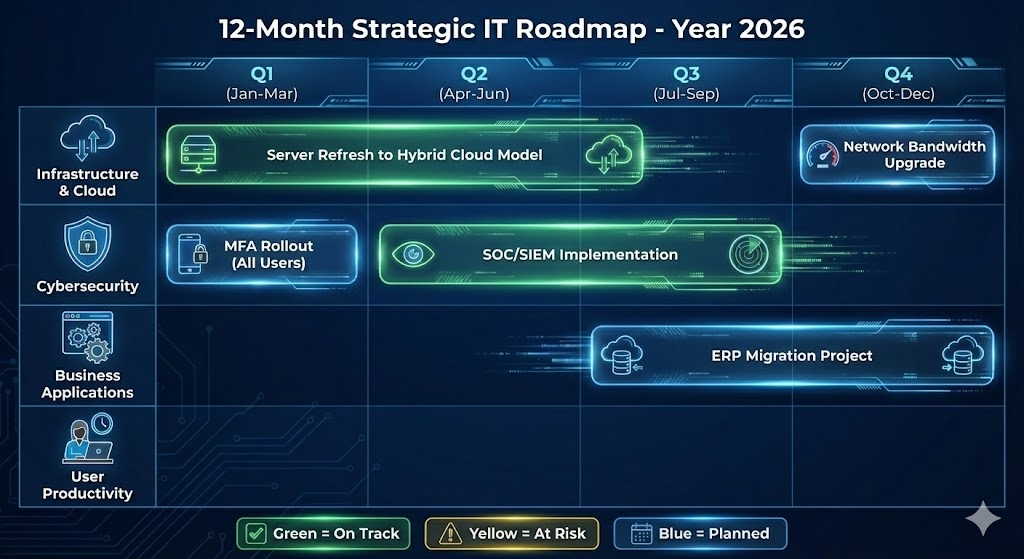
Example Roadmap Entry:
Initiative Category Timeline Budget Business Impact Status Migrate ERP to CloudInfrastructureQ3 2025$15k setup / $2k monthlyEnable remote access for sales team, eliminate on-site server maintenancePlanned
Part 2: Improvement
How Can a Business Make Its IT Costs More Predictable?
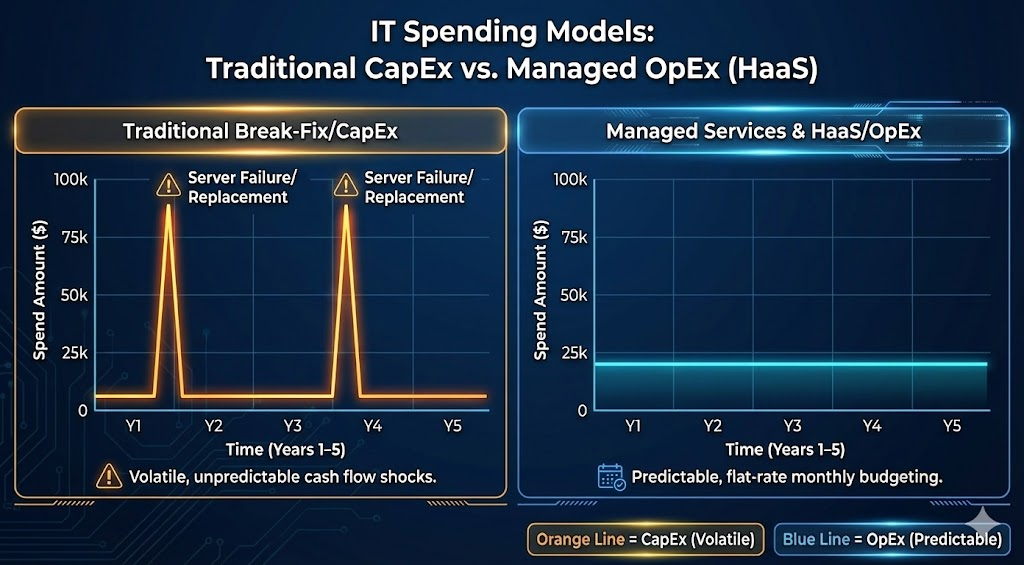
Unpredictable IT spending frustrates CFOs and hampers strategic planning. Emergency repairs, sudden licensing changes, and catastrophic hardware failures create budget volatility. Moving from reactive spending to predictable costs requires a fundamental shift in procurement strategy—from ownership to utilization.
The Power of Hardware as a Service (HaaS)
Traditional hardware procurement follows a boom-and-bust cycle. You spend $50,000 on new laptops and servers, pay nothing for five years, then face another massive capital expense when everything ages out simultaneously. This creates cash flow spikes and leaves you using obsolete equipment for years.
Hardware as a Service (HaaS) eliminates this volatility. In a HaaS model, hardware costs are included in your monthly service fee—you're essentially leasing equipment with built-in lifecycle management.
Why HaaS Transforms Budget Predictability:
Consistent OpEx: A $20,000 server purchase becomes a manageable monthly operating expense spread over 36-48 months. This makes cash flow forecasting accurate and eliminates capital budget battles.
Automatic Refresh Cycles: HaaS contracts typically include technology refreshes every 3-4 years. Your team always works with modern, fast equipment. You're never stuck running decade-old servers because there's no budget for replacement.
Warranty Management: When a HaaS device fails, it's the provider's problem. You don't pay for replacement parts or worry about vendor warranty claims—it's covered under the service agreement.
Tax Advantages: In many jurisdictions, OpEx payments can be fully deducted in the current tax year, whereas capital purchases must be depreciated over multiple years. This can significantly impact your effective cost (consult your tax advisor for specifics).
Technology Lifecycle Alignment: HaaS prevents the common problem of some equipment aging out while others are mid-lifecycle, creating a patchwork of support complexity.
Standardization: The Hidden Cost Saver
Supporting five different laptop models costs exponentially more than supporting one. Different drivers, different spare parts inventories, different troubleshooting procedures—it all adds up.
To improve cost predictability, your strategic IT plan should mandate a Standard Operating Environment (SOE). Define one approved laptop model, one firewall platform, one email system. This dramatically reduces support hours and makes replacement costs easy to forecast. When it's time to order new equipment, there's no research required—you know exactly what you're buying and what it costs.
Standardization also improves security. When every machine runs the same configuration, patches and security updates can be deployed consistently. There are no forgotten systems running outdated software.
Proactive vs. Break-Fix: Ensuring Your Provider Adds Value
Many MSPs claim proactive management but operate reactively. They respond quickly when systems fail but don't prevent the failures in the first place. A truly proactive partner identifies and resolves issues before users notice them.
How to Distinguish Proactive from Reactive:
Automated Patch Management: Reactive shops patch after vulnerabilities are exploited. Proactive partners maintain automated patching schedules that update your systems weekly, including third-party applications like Adobe Reader, Chrome, and Java—the most commonly exploited attack vectors.
Regular Strategy Sessions: If you only hear from your IT provider when things break, they're reactive. Proactive partners schedule quarterly technology roadmap reviews (vCIO meetings) to discuss strategy, upcoming needs, and optimization opportunities—not just ticket queues.
Asset Lifecycle Reporting: Proactive providers send detailed reports six months before warranties expire or equipment reaches end-of-life. This gives you time to budget for replacements and plan transitions, rather than facing emergency purchases when systems fail.
Performance Trending: Are they tracking how your systems perform over time? Proactive monitoring identifies degrading performance before it impacts users—a server that's gradually slowing down gets attention before it crashes.
The Cost of Downtime: Why Proactive Management Pays for Itself
Consider the true cost of a four-hour server outage: 50 employees at an average fully-burdened cost of $50/hour equals $10,000 in lost productivity—plus the emergency repair bill, potential data loss, and damage to customer relationships. If your e-commerce site goes down during peak hours, multiply that by your hourly revenue.
A proactive MSP costs more per month than a break-fix shop, but a single prevented outage often covers an entire year of the price difference. This is why mature businesses view proactive IT as insurance, not expense.
Part 3: Comparison
Infrastructure Decision Guide: Public Cloud vs. Private Cloud vs. On-Premises
Choosing where your data and applications live is one of the most consequential decisions in your strategic IT plan. This choice impacts cost structure, performance, security posture, compliance capabilities, and operational flexibility. There's no universal "best" answer—the right infrastructure depends on your specific workloads, regulatory requirements, and business model.
On-Premises Infrastructure
What it is: You purchase physical servers and networking equipment, housing them in your office server room or a closet-turned-data-center.
Best For:
- Manufacturing operations with machinery requiring sub-10ms latency connections
- Businesses in rural areas with unreliable internet connectivity
- Organizations with highly static legacy applications that are prohibitively expensive to re-architect
- Companies with strict data sovereignty requirements preventing off-site storage
Advantages:
- Complete physical control over hardware
- No ongoing cloud subscription fees
- Data never leaves your premises
- No internet dependency for internal operations
- Predictable long-term costs after initial purchase
Disadvantages:
- High upfront capital expenditure ($50k-$500k+ depending on scale)
- You're responsible for physical security, cooling, power redundancy, and fire suppression
- Difficult to scale quickly—adding capacity requires hardware procurement and installation
- Single location creates geographic risk (fire, flood, natural disaster)
- Requires in-house expertise or MSP support for maintenance
Public Cloud (AWS, Microsoft Azure, Google Cloud)
What it is: You rent computing resources from global hyperscalers. Infrastructure is multi-tenant (shared underlying hardware) but isolated and secure for each customer.
Best For:
- Modern businesses and startups without legacy infrastructure investments
- Organizations with fluctuating workloads (e-commerce sites scaling for Black Friday, seasonal businesses)
- Companies needing rapid deployment of new capabilities
- Businesses wanting access to advanced tools (AI/ML, big data analytics, IoT platforms)
Advantages:
- Virtually unlimited scalability—spin up servers in minutes
- Pay-as-you-go utility pricing—you only pay for what you use
- Geographic redundancy built in—data replicated across multiple data centers
- No hardware maintenance burden
- Instant access to cutting-edge capabilities (serverless computing, managed databases, AI services)
- Built-in disaster recovery options
Disadvantages:
- Ongoing OpEx can become expensive if not carefully managed—"cloud bill shock" is common
- Requires cloud-specific expertise to architect securely and cost-effectively
- Data egress fees (charges for moving data out) can be substantial
- Less predictable monthly costs if workloads fluctuate
- Compliance complexity in some regulated industries
Private Cloud
What it is: A cloud environment dedicated exclusively to your organization. Typically hosted in a third-party data center (colocation) or managed by a vendor providing dedicated infrastructure—no shared hardware with other customers.
Best For:
- Highly regulated industries (healthcare, finance, government) requiring strict isolation
- Mid-market companies wanting cloud benefits but needing consistent, predictable performance for legacy ERP systems
- Organizations with specific compliance requirements that public cloud doesn't easily satisfy
- Businesses requiring custom hardware configurations not available in public cloud
Advantages:
- High security through physical and logical isolation
- Customizable performance—you control the hardware specifications
- More predictable flat-rate pricing than metered public cloud
- Meets stringent regulatory requirements for data isolation
- Better performance consistency than multi-tenant environments
Disadvantages:
- More expensive than public cloud for general-purpose workloads
- Slower to deploy than public cloud—still requires hardware procurement and configuration
- Limited scalability compared to public cloud—you're constrained by your purchased capacity
- Still requires expertise to manage effectively
The Verdict: Hybrid Cloud as the Pragmatic Solution
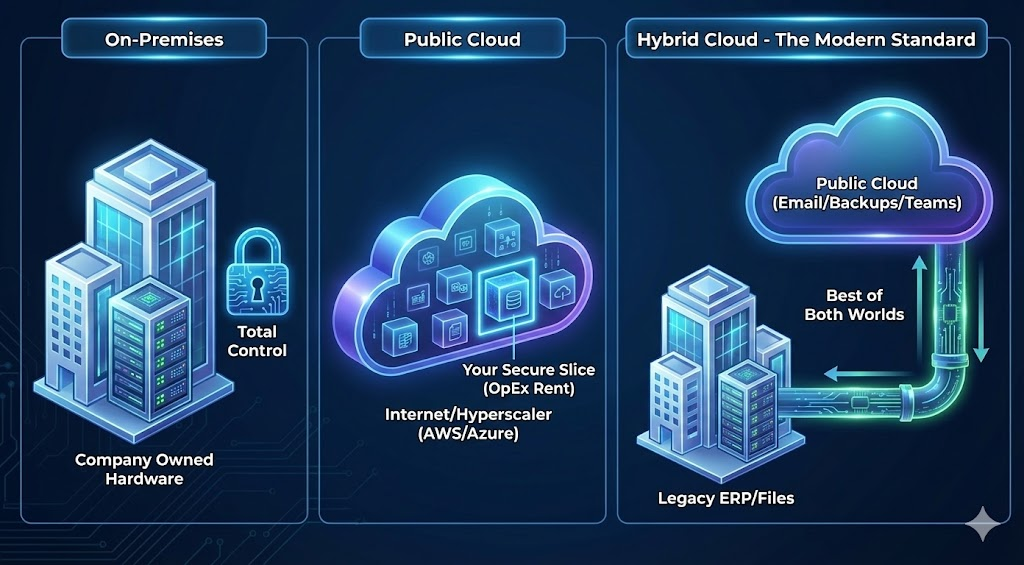
The public cloud vs. private cloud debate often ends in hybrid architecture—and for good reason. Most mid-sized businesses today use a hybrid approach that matches workload requirements to the most appropriate infrastructure:
Legacy applications and databases with consistent performance requirements → Private cloud or on-premises Email, collaboration tools (Microsoft 365, Zoom), and SaaS applications → Public cloud File storage and backup → Public cloud with geographic redundancy Customer-facing web applications needing to scale → Public cloud Sensitive financial or health records with strict compliance requirements → Private cloud
This approach optimizes cost (commodity workloads in cheap public cloud), control (sensitive systems in private infrastructure), and compliance (regulated data in appropriate environments).
Summary Checklist for Business Leaders
As you evaluate your current IT posture, use this checklist to ensure alignment with best practices:
Research Phase:
- [ ] Are you choosing an MSP based on comprehensive value rather than just monthly cost?
- [ ] Have you thoroughly reviewed your MSP contract for response time guarantees, hidden billing triggers, and offboarding provisions?
- [ ] Does your MSP have demonstrable expertise in your specific industry and regulatory environment?
- [ ] Have you verified their internal security practices and supply chain risk management?
Planning Phase:
- [ ] Do you have a written strategic IT plan updated within the last 12 months?
- [ ] Does your technology roadmap clearly connect IT initiatives to measurable business outcomes?
- [ ] Is your roadmap format visual and accessible to non-technical stakeholders?
- [ ] Have you identified and prioritized technical debt that's creating business risk?
Improvement Phase:
- [ ] Are you still making large capital hardware purchases, or have you evaluated Hardware as a Service for budget smoothing?
- [ ] Have you established a Standard Operating Environment to reduce support complexity?
- [ ] Is your IT provider truly proactive (preventing issues) or just reactive with good response times?
- [ ] Do you receive regular performance and lifecycle reports that enable forward planning?
Infrastructure Phase:
- [ ] Have you made a conscious, documented decision about your infrastructure strategy (on-prem, public cloud, private cloud, hybrid)?
- [ ] Does your infrastructure choice align with your compliance requirements and business model?
- [ ] Have you calculated the total cost of ownership for different infrastructure options, including hidden costs like staff time?
- [ ] Do you have a documented disaster recovery plan that matches your infrastructure choices?
Conclusion
Moving from "keeping the lights on" to "strategic IT advantage" requires the right partner and a clear plan. Technology represents too large an investment—and too critical a business enabler—to manage through reactive decision-making.
By formalizing your technology roadmap, carefully vetting MSP partnerships, modernizing procurement strategies, and making intentional infrastructure choices, you transform IT from a cost center into a competitive differentiator. Companies that execute this transformation can scale faster, operate more efficiently, and respond more quickly to market opportunities than competitors still managing IT reactually.
The businesses that thrive over the next decade won't necessarily be those that spend the most on technology—they'll be those that spend most strategically.
Next Steps
Currently evaluating MSPs? We can provide a customized list of interview questions tailored to your industry, helping you separate marketing claims from operational reality during your vetting process.
Need to build your first technology roadmap? We offer roadmap workshops that guide your leadership team through the process of connecting business objectives to IT initiatives with clear timelines and budgets.
Unsure about your infrastructure strategy? Our infrastructure assessment analyzes your workloads and provides specific recommendations for optimal placement across on-premises, private cloud, and public cloud environments.